Built for musicians who perform live

Your setlist.
Reimagined.

SetMate combines chord charts, Nashville Number System charts, a full guitar toolkit, guitar tabs, and dedicated performance and practice modes into one app — so you can spend less time prepping and more time playing.

Try SetMate free Try online Download on the App Store
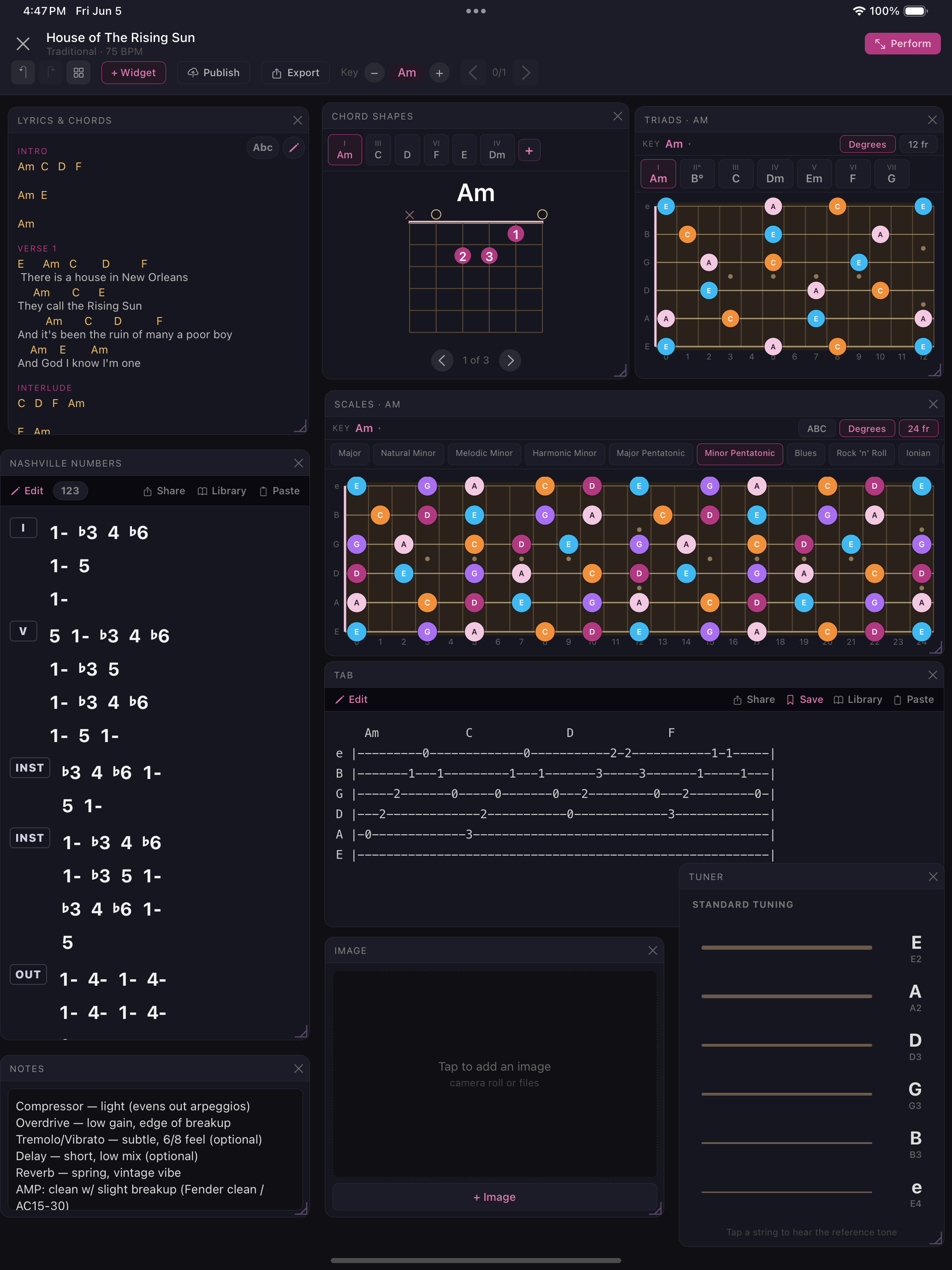
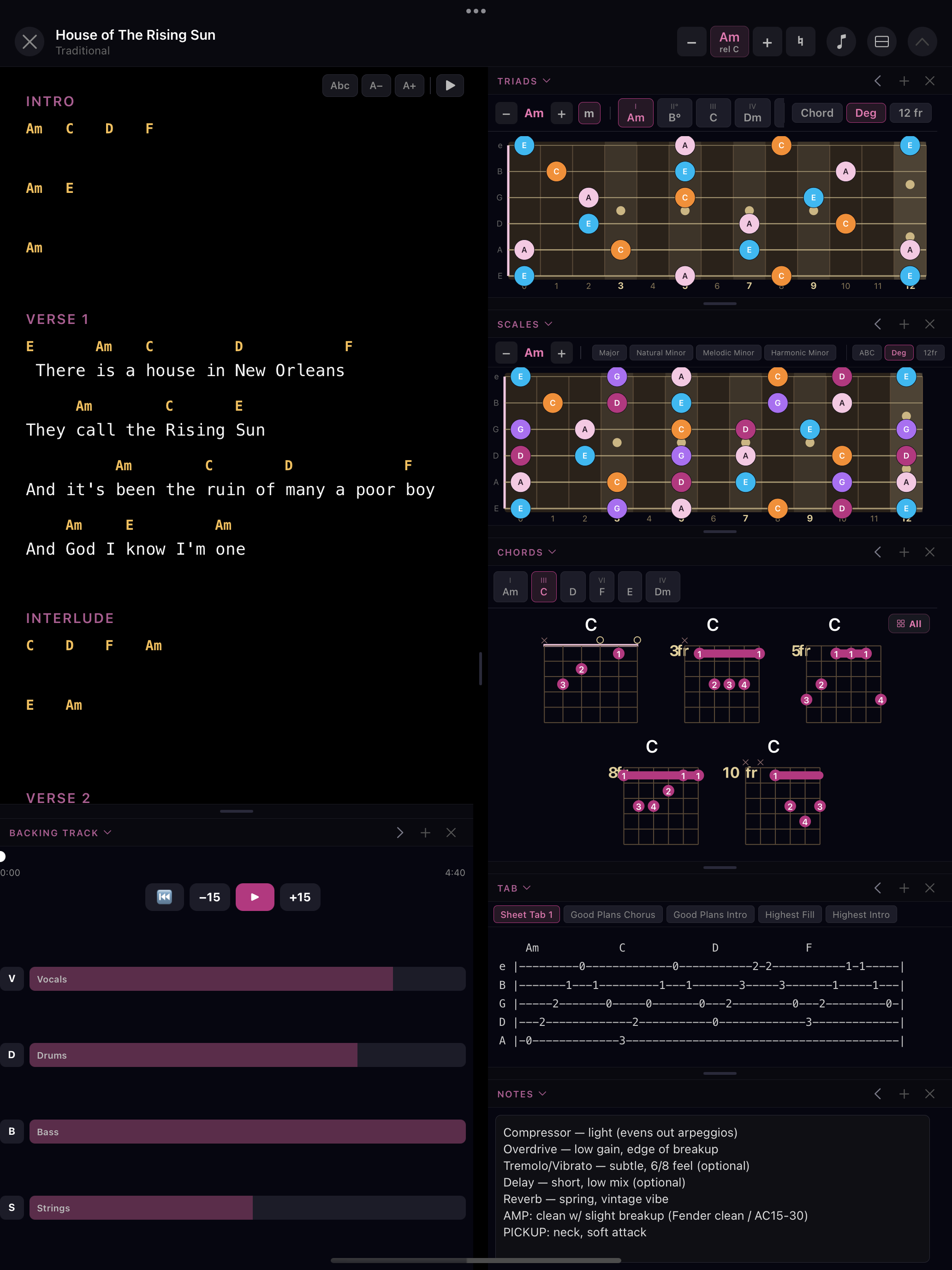
SetMate gig view showing lyrics, chord shapes, scales, triads, and image widgets
Everything you need

Built for the stage, not the studio

Every tool a gigging musician needs, in one screen — no more switching between apps mid-set.

🎭
Performance Mode
Full-screen mode optimised for the stage. Lyrics and chords front and centre, with your guitar tools in a resizable side panel.
📋
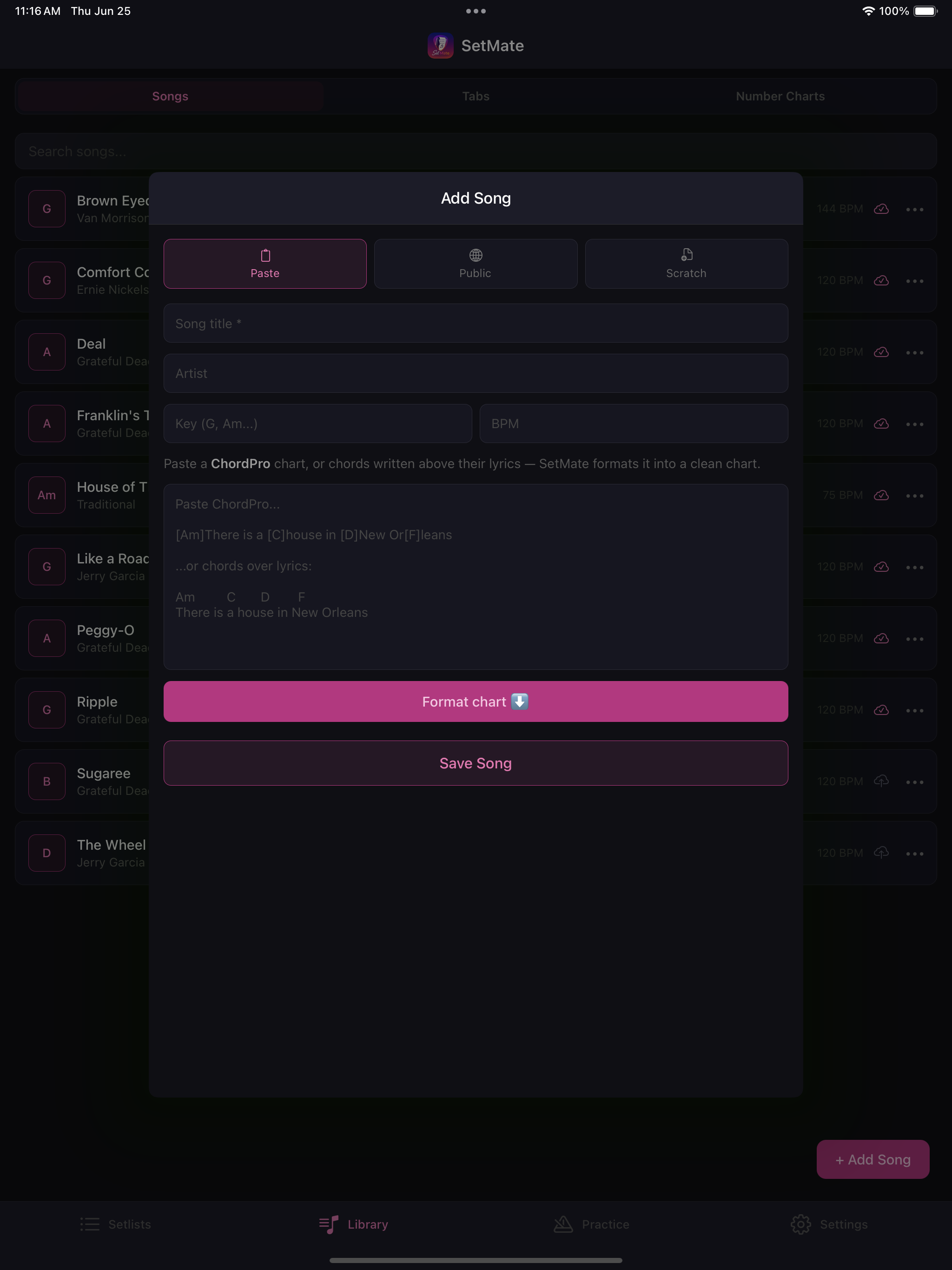
Paste & Import
Paste a ChordPro chart or chords over lyrics and SetMate formats it into a clean, performance-ready sheet in seconds.
🎸
Guitar Scale Fretboard
See the full neck with your scale highlighted in note names or Nashville numbers. Major, minor, pentatonic, Dorian, blues, and 20+ more.
🔢
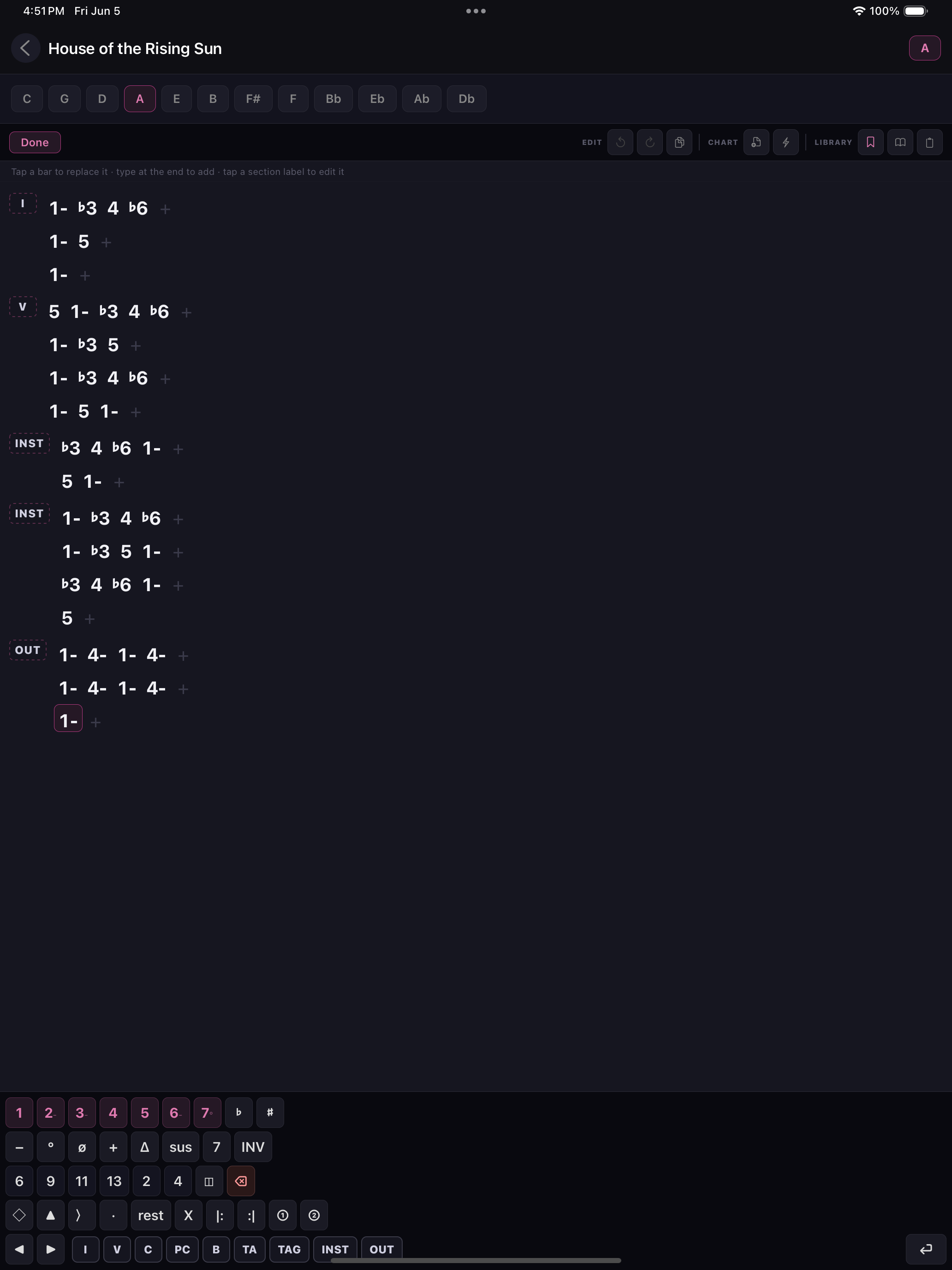
Nashville Number System
Build, paste, or auto-generate full NNS charts with a dedicated number keyboard. Save charts to a reusable library and toggle between numbers and chord names.
🎵
Chord Diagrams
Finger positions for every chord in the song. Tap through multiple voicings to find the one that fits your style.
🎼
Diatonic Triads
All 7 diatonic triads for the song's key visualised on the fretboard. Know which chord shapes fit before you play them.
🎯
Practice Mode
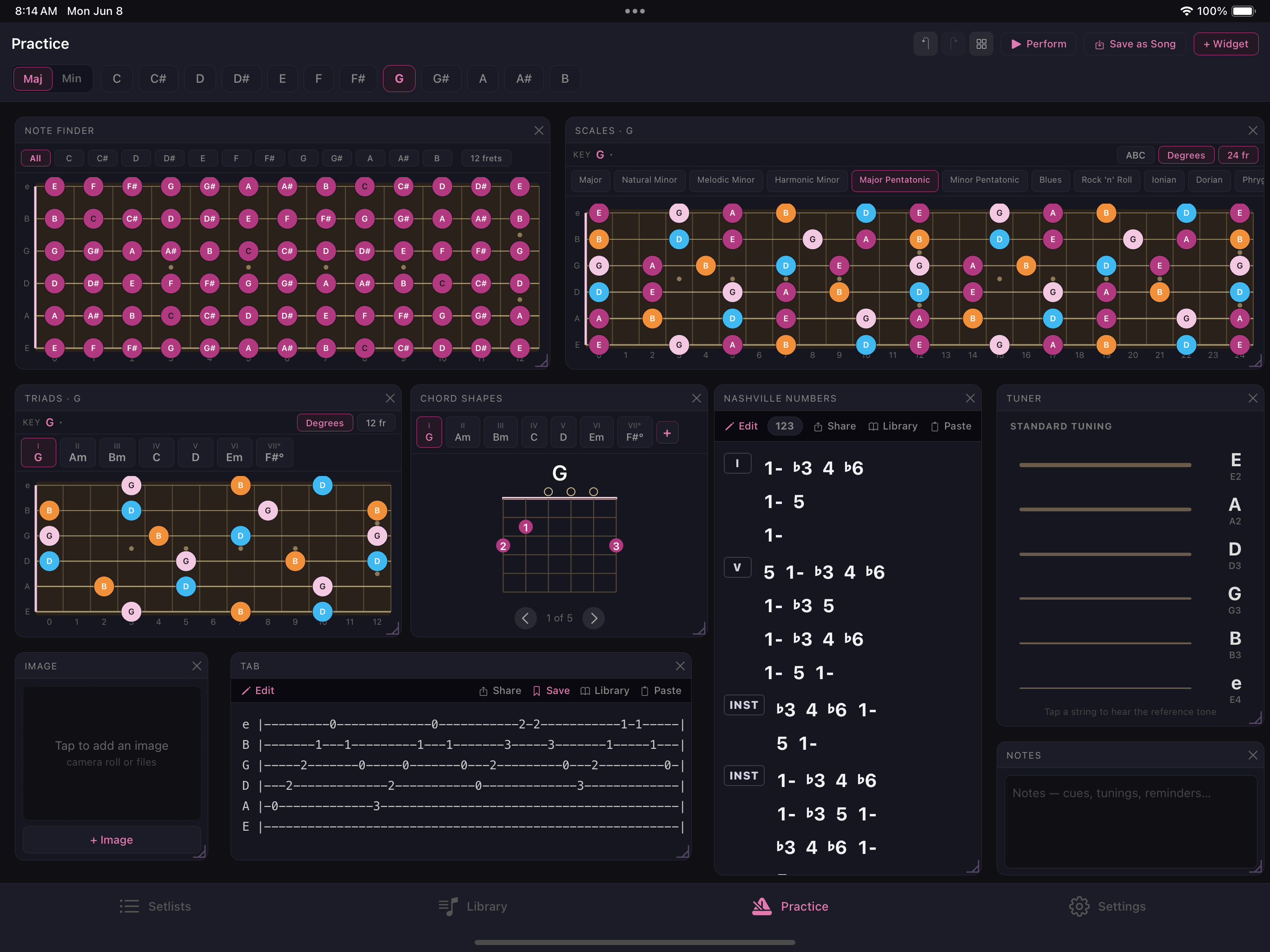
A dedicated woodshed. Pick any key — major or minor — and drill scales, triads, chords, and the Note Finder, no song required.
🎸
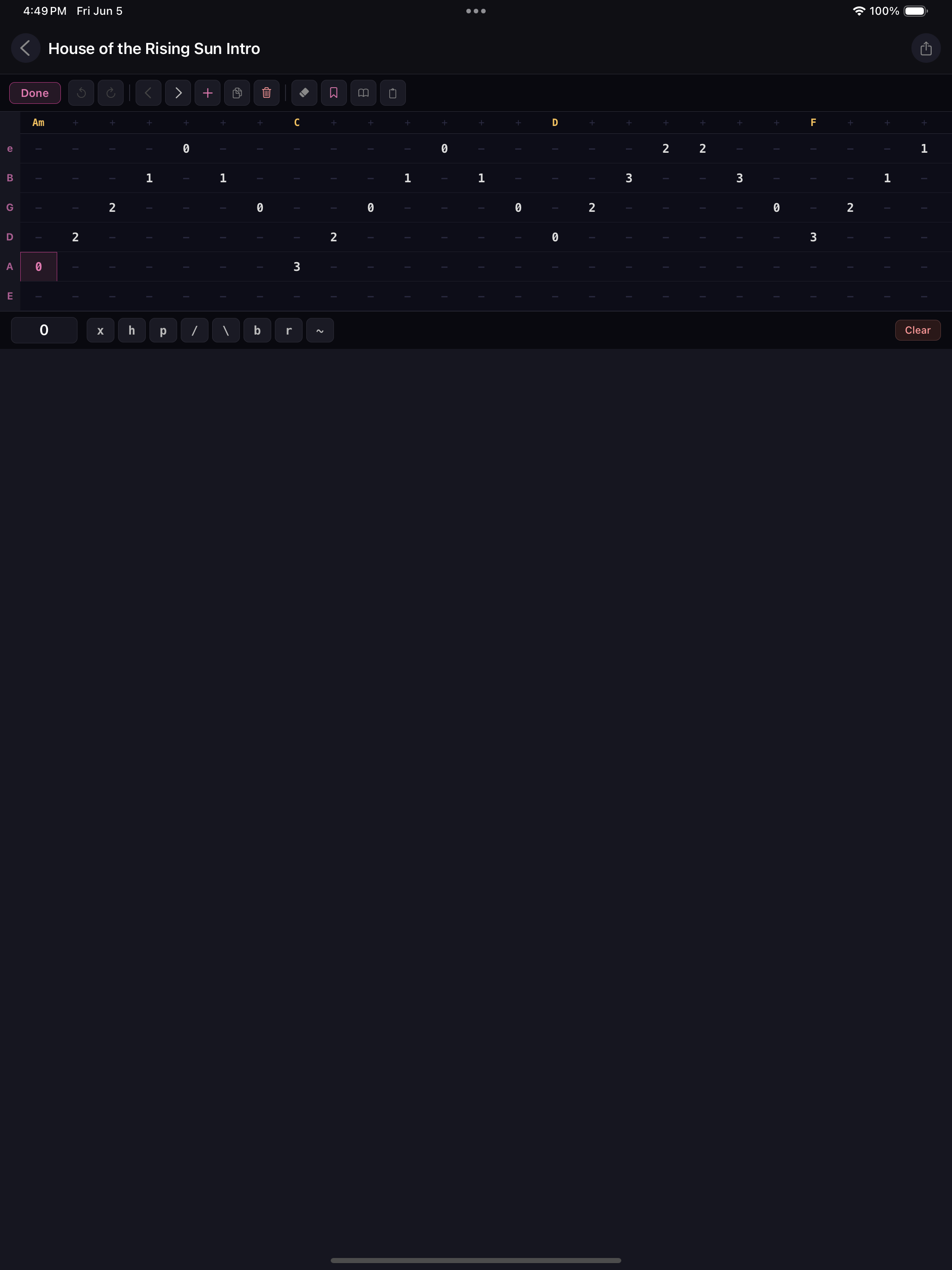
Guitar Tabs
Build tabs cell by cell, or paste them from anywhere and edit. Save your favourites to a Tab Library and reuse them across any song.
🔔
Built-in Tuner
Tap a string to hear a clean reference tone and tune up by ear — no extra app, right between songs.
☁️
Cloud Sync & Offline
Your songs and setlists sync across every device — and stay readable offline, so a dead signal at the venue never leaves you stranded.
Performance Mode

The stage is no place for clutter

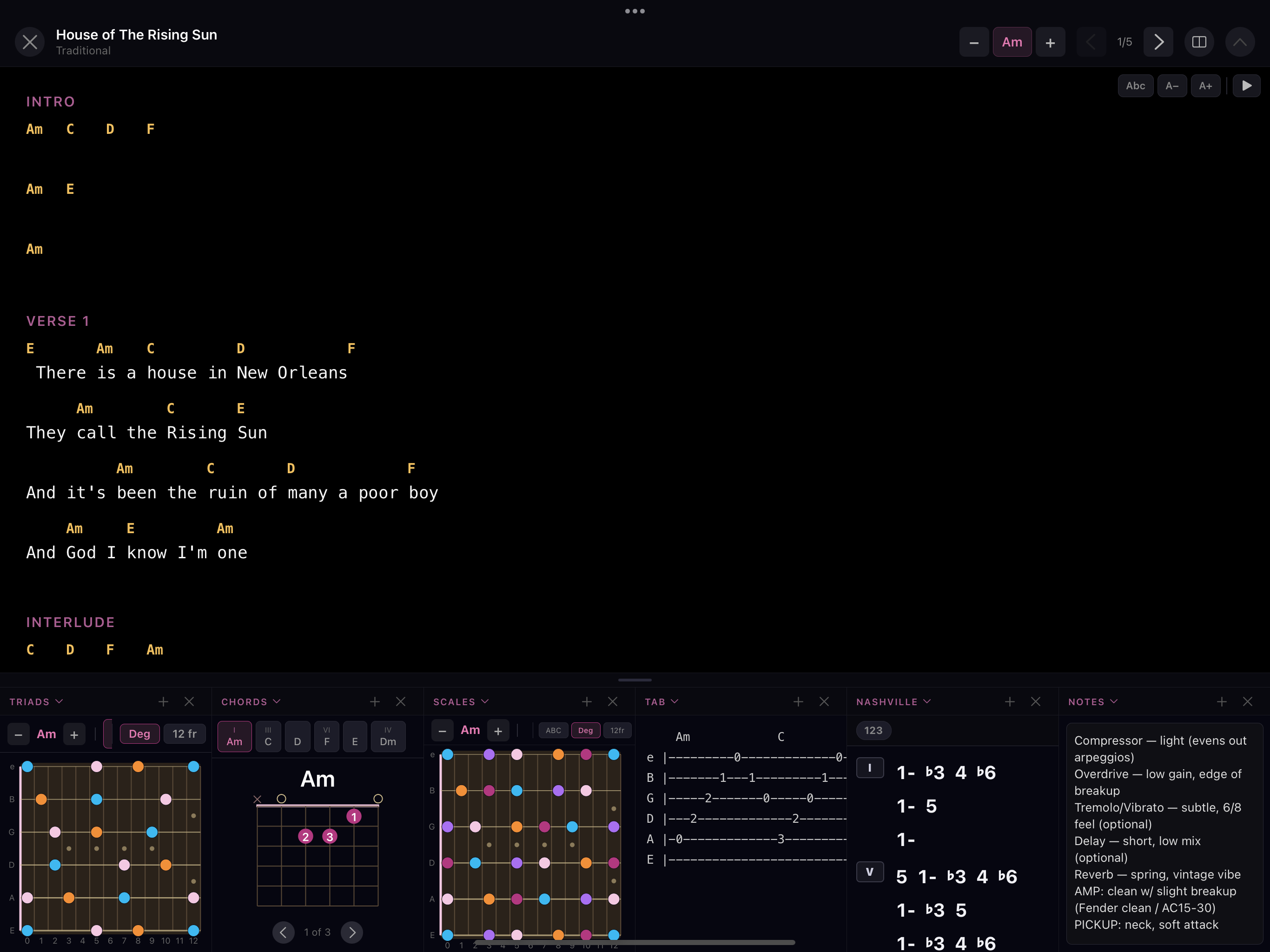
Tap Perform and everything disappears except what you need. Chords and lyrics fill the screen, with a fully customisable side panel for your guitar tools.

SetMate performance mode with lyrics beside a guitar tools side panel
SetMate performance mode with lyrics above a row of guitar tool widgets
Easy Import

Bring your charts in by pasting

Already have your charts? Paste a ChordPro snippet or chords written above their lyrics, and SetMate formats it into a clean, transposable sheet — ready to drop into a setlist. Or browse charts shared by other SetMate users and add them with one tap.

SetMate song import — paste a chord chart
Nashville Number System

Chart any song in numbers, the way session players do

The Nashville Number System is the shorthand used by session musicians everywhere — numbers instead of chord names, so the chart works in any key. SetMate brings it fully to life: auto-generate a chart from any song's chords, or build one from scratch with a purpose-built keyboard.

SetMate Nashville Number System chart editor
Guitar Tabs

Build, paste, and reuse tabs — right in your song

SetMate's tab editor lives inside your song's widget panel, so you can reference a riff, intro, or solo at a glance while the chord chart is still right there. Build tabs from scratch or paste directly from any tab site — SetMate parses the standard six-line format automatically.

SetMate guitar tab editor with six-string grid and technique support
Guitar Toolkit Widgets

Every tool, side by side

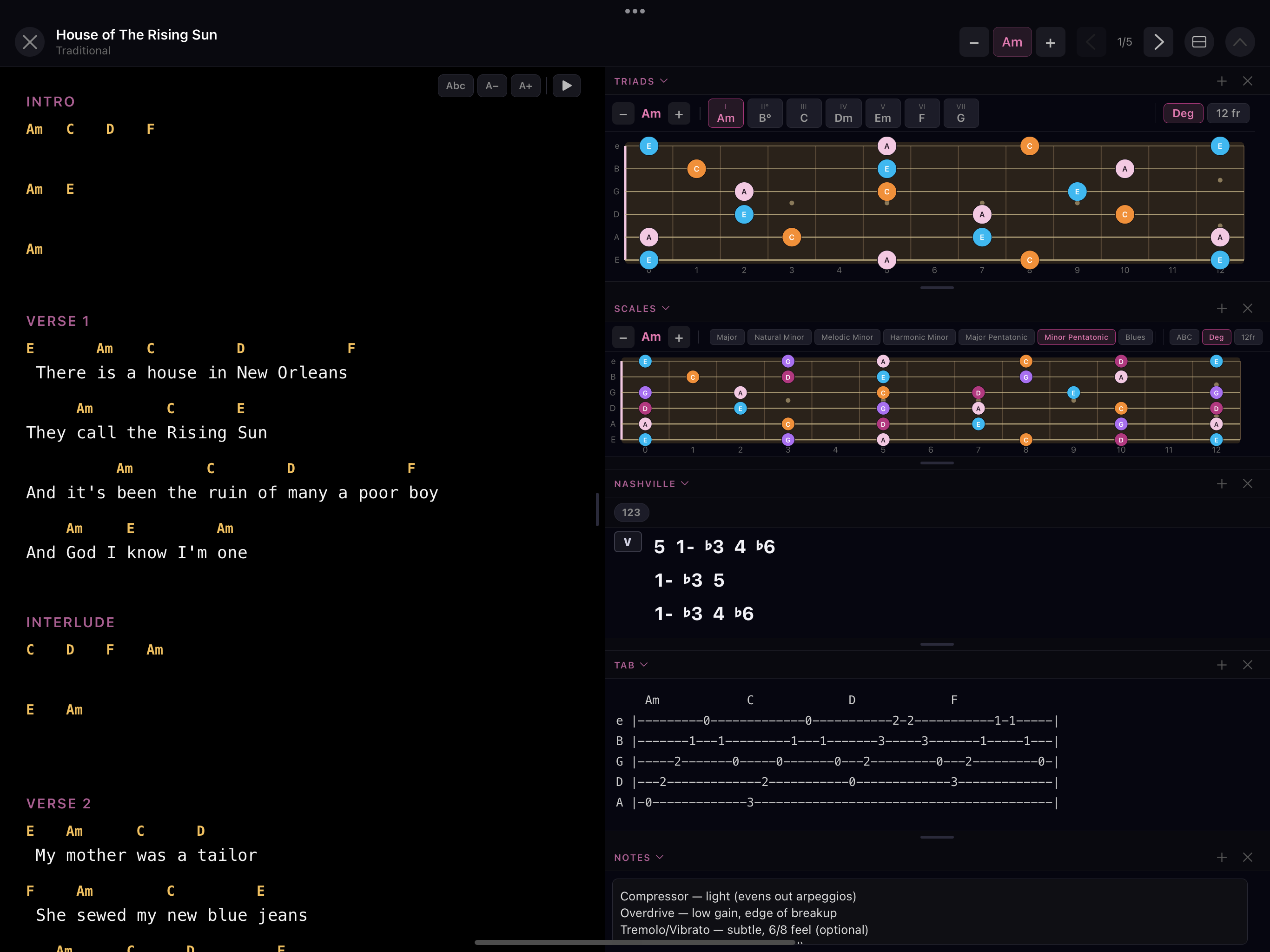
The gig view puts your chord chart on the left and a fully customisable widget panel on the right. Add as many widgets as you need, resize them, and set a different key per widget — independently of the song's key.

SetMate gig view with chord shapes, scales, triads, notes, and image widgets
Practice Mode

A woodshed that needs no song

Practice Mode is a dedicated space for drilling the fretboard. Pick any key — major or minor — and lay out scales, triads, chords, tabs, and the Note Finder side by side. No song required, nothing to set up.

SetMate Practice Mode with Note Finder, scales, triads, chord shapes, tabs, Nashville numbers, and tuner
Library, Setlists & Community

Build your book. Share your charts.

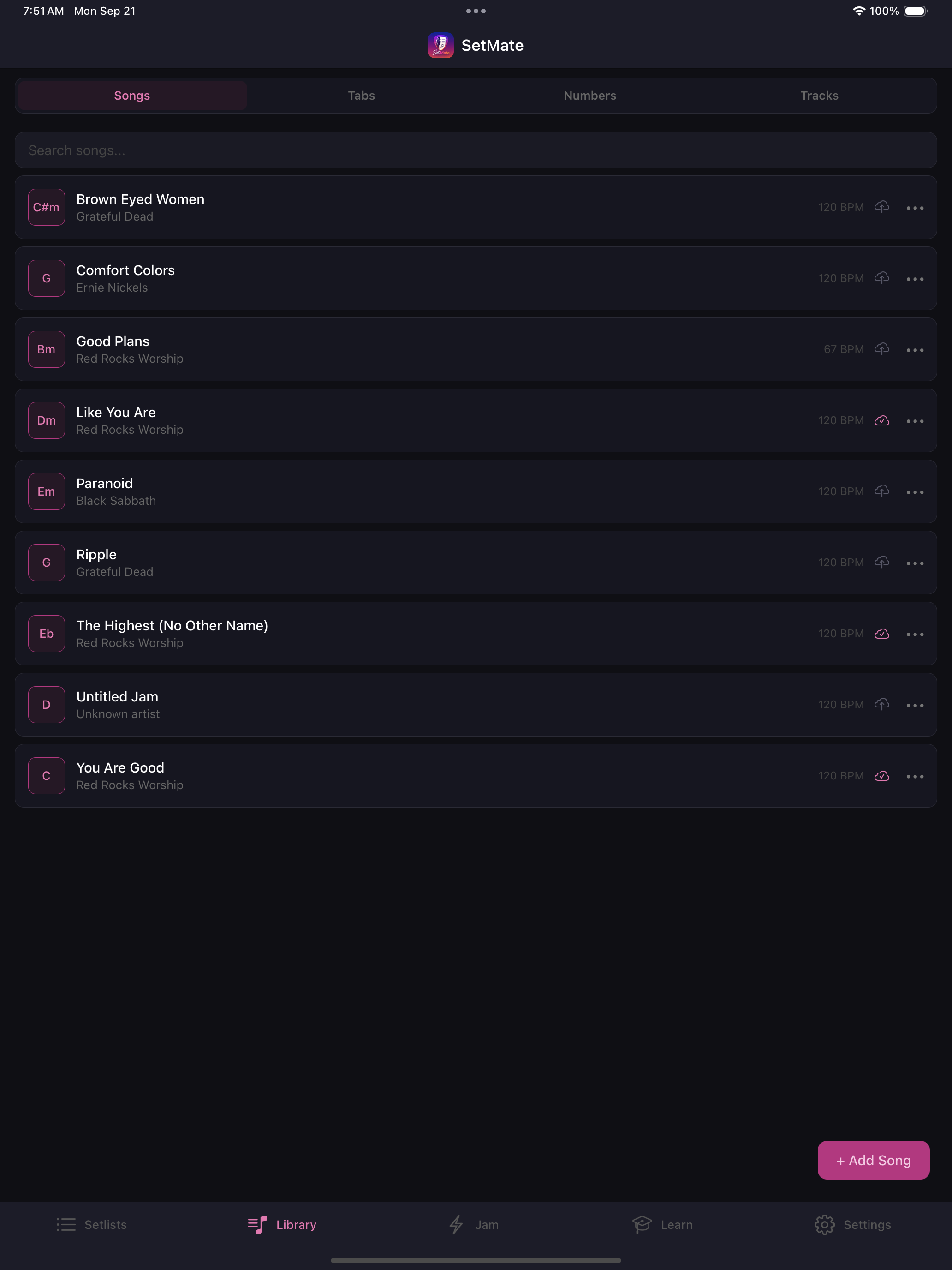
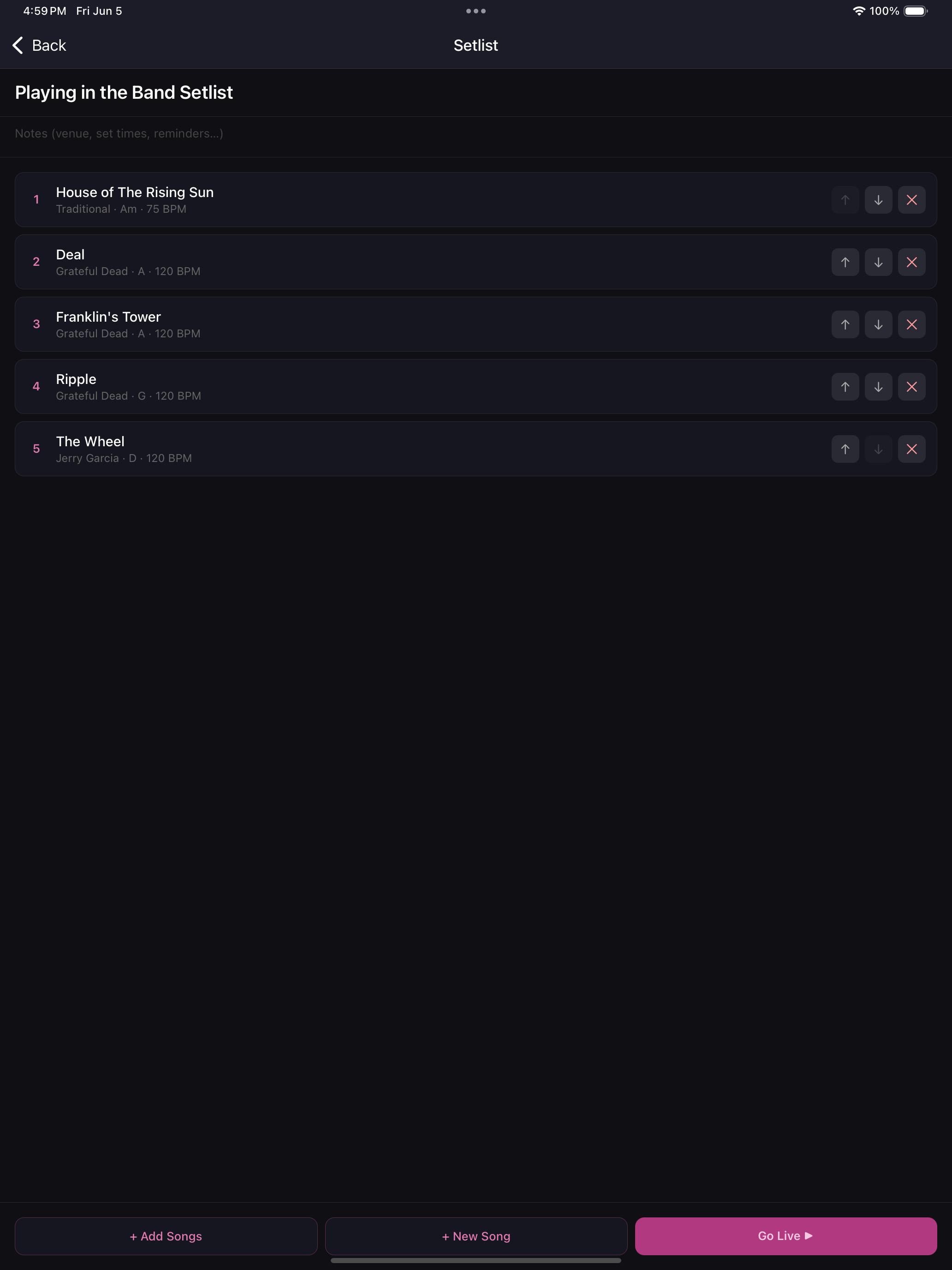
Organise your songs into setlists and navigate between them live. Publish any chart publicly so other musicians can find it — or browse the community library and add great charts to your own book with one tap.

SetMate public community songsheets browser
SetMate public songsheet preview — view a chart before adding it to your library
SetMate setlist view
Pricing

Simple, honest pricing

Start free. Upgrade when you're ready. Or own it forever.

Free forever
SetMate Free
$0
No credit card needed
Get started free
  • Up to 3 songs
  • 2 setlists
  • Import by pasting ChordPro or chord/lyric text
  • Every widget & tool — scales, tabs, Nashville numbers, tuner
  • Performance & practice modes
  • Cloud sync
  • Unlimited songs & setlists
  • Priority support
14-day free trial
SetMate Pro
$4.99/mo
or $39.99 / year — save 33%
Start free trial
  • Everything in Free
  • Unlimited songs
  • Unlimited setlists
  • Cloud sync across all devices
  • Priority support
⚡ Pay once
SetMate Lifetime
$99.99
One-time — use forever
Buy lifetime access
  • Everything in Pro, forever
  • All future features included
  • No recurring charges
  • Unlimited songs & setlists
  • Priority support

All plans include a 14-day free trial of Pro. Cancel anytime.

Built for musicians who perform live
No sheet music reading required
Nashville Number System built in
Works offline at the venue
iOS & Web
Cancel anytime
FAQ

Questions, answered

Everything worth knowing before your first set.

Is SetMate free to use?+
Yes — the free plan is free forever and includes up to 3 songs, 2 setlists, every widget and tool (scales, tabs, Nashville numbers, tuner), and both Performance and Practice modes. No credit card required to start.
Is there a free trial of Pro?+
Every Pro plan starts with a 14-day free trial. You get full Pro access right away, and if you cancel any time before the trial ends you won't be charged.
How much does Pro cost?+
Pro is $4.99/month or $39.99/year (save about 33%). Prefer to pay once? SetMate Lifetime is a single $99.99 payment with no recurring charges and all future features included. See Pricing for the full comparison.
What do I get with Pro?+
Unlimited songs and setlists, cloud sync across all your devices, and priority support — on top of everything in the free plan.
How do I cancel, and what happens if I do?+
You can cancel any time from your App Store subscription settings — there's a Manage link inside the app too. Cancel during the trial and you won't be charged; either way you keep Pro until the current period ends.
What happens to my songs if I downgrade?+
Nothing is ever deleted. If you go back to the free plan with more than the free limits, the extra songs and setlists are simply locked until you upgrade again — your data is always safe.
Does SetMate work offline?+
Yes. Your library and each song's widgets are cached on your device, so you can pull up charts and run Performance mode at a venue with spotty or no signal.
What is Performance mode?+
A distraction-free live view built for the stage: large auto-scrolling lyrics and chords, one-tap transpose, and reference widgets (scales, chord shapes, tabs) right beside your lyrics — with setlist navigation so you can move between songs quickly.
How do I get my songs into SetMate?+
Paste a ChordPro chart or chords written above their lyrics, and SetMate formats it into a clean, transposable sheet. You can also write a chart by hand, or browse charts shared by other SetMate users and add them with one tap. Once a song is in, edit the lyrics, chords, key, BPM and capo anytime.
Can I import my own songs or charts?+
Absolutely. Import from a URL or paste chord-over-lyric text and it's converted automatically, build a chart from scratch, or copy one from the public community library that other musicians have shared.
What's the Nashville Number System support?+
Any chart can switch between standard chord names and Nashville numbers with a tap, and you can build and save your own number/cadence charts — perfect for transposing on the fly or playing with any band in any key.
What platforms is SetMate on?+
SetMate runs in any browser at app.setmateapp.com, and there's a native iOS app on the App Store. With Pro's cloud sync, your songs and setlists stay in step across every device.
Refer & earn

Love SetMate? Get paid to share it.

Know musicians who'd love SetMate? Share your referral code and earn a commission every time one subscribes — and they get a discount when they sign up on the web. Made for teachers, worship leaders, and music creators.

Up to $10 earned per referral
Save $10 for your audience (web)
Monthly payouts